
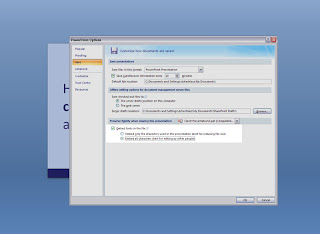
 If you've ever downloaded new fonts, created a design and the opened it on another computer only to find that your fonts are missing, you should remember to embed fonts in the file. Especially if you're preparing a presentation that you plan to distribute to others, be sure that you check this option by clicking on the Tools button in the File/Save As dialog box. This will work for most TrueType fonts on the Windows platform. You have the choice to embed only the characters used in the presentation (best for reducing file size) or embed all characters (best for editing by other people). I would strongly recommend you embed all characters since there is always some sort of editing/changes that follow eventually.


